NX + 3Dconnexion

Accelera la progettazione e la produzione

Supportando ogni aspetto dello sviluppo del prodotto, dall’ideazione alla progettazione e alla produzione, NX offre agli utenti un set di strumenti integrati che coordinano le discipline preservando l’integrità dei dati e l’intento progettuale.

SpaceMouse

Performance aumentata

Con un potente sensore 6DoF, lo SpaceMouse rivoluziona l’ispezione dei modelli, consentendo una migliore comprensione dei progetti e una modifica più rapida. Il flusso di lavoro a due mani consente un accesso semplificato ai comandi, un minor numero di errori e una riduzione dell’affaticamento.

  • Navigazione superiore per un’interazione rapida e precisa con i modelli
  • Manipola facilmente le viste con i pulsanti QuickView e CustomView
  • Passa rapidamente da un ambiente all’altro, dalla modellazione alla stesura, e molto altro ancora.


Scopri la gamma di prodotti SpaceMouse

Play video

CadMouse

Orbita senza sforzo

Goditi un movimento preciso con meno clic di errore e pulsanti di facile accesso che cambiano la visuale in un istante. Il pulsante centrale del mouse dedicato offre migliori prestazioni e comfort durante le lunghe sessioni di lavoro.

    • Ottimizza il processo di progettazione con un pulsante centrale del mouse dedicato
    • Visualizza i dettagli con un solo clic e seleziona e analizza con precisione i componenti
    • Il sensore ad alte prestazioni garantisce una maggiore precisione in tutte le attività

Scopri la gamma CadMouse

Play video

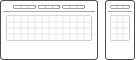
Keyboard and Numpad

Flussi di lavoro semplificati

Accesso rapido e semplice ai comandi preferiti del software NX, creazione e accesso a macro complesse. Facilita l’immissione di numeri ripetuti e consente di posizionare liberamente il Numpad ovunque sia necessario.

  • Velocizza il lavoro con i tasti funzione programmabili per NX
  • Riduce l’affaticamento del polso grazie al poggiapolsi a grandezza naturale
  • I tasti silenziosi offrono un ambiente di lavoro piacevole

Scopri la Keyboard Pro with Numpad

Play video

Scopri di più

Play video
Video

How to Use and Customize SpaceMouse in Siemens NX

Dentsu Soken Indonesia
Play video
Video

Basic 3Dconnexion SpaceMouse Operations in Siemens NX

Dentsu Soken Indonesia

Using NX from Siemens every day, I really appreciate the attention to detail in the 3Dconnexion CadMouse Pro Wireless. This is a professional tool, built with far more solid materials than your average computer mouse. Wireless or tethered, it not only feels great in my hand but gives me precise positional control. A highlight is the awesome middle mouse button that so many CAD systems still use these days… There is still a scroll wheel, to be clear, but I didn’t realize how much I would appreciate the separate middle button until using it!

The SpaceMouse Enterprise enhances my workflow processes while modelling in CAD. I can navigate and work with tools and functions simultaneously to great effect. Zoom and rotation actions soon become second nature and you really do feel like you are able to hold your model in front of you whilst creating and editing. Overall, I find the 3Dconnexion products an excellent addition to Siemens mechanical design software; NX and Solid Edge, which greatly enhance my productivity and speed up my working processes.

With the SpaceMouse Wireless and CadMouse Wireless, I can work efficiently on the go in Designcenter NX. Precise control, stable performance, and ergonomic design make them perfect tools for my presentations with customers and prospects. The dedicated middle button on the CadMouse is definitely my favorite feature when working with Designcenter NX!

If you're a CAD engineer, a SpaceMouse is a game changer. It’s way more intuitive than a regular mouse, making 3D modeling a breeze and speeding up your work. Plus, the ergonomic design means less wrist strain, even after long hours. It also helps you handle complex tasks with more precision. If you want to work faster and more comfortably, I highly recommend giving it a try!

The products from 3Dconnexion can be individually customized and enable me to work efficiently and without fatigue. Thanks to the smart customization, I am about 50% faster when working in Siemens NX. The customizable function keys and the availability of the decimal point on the Numpad Pro make work significantly easier and a lot of fun.

Quali sono le funzionalità disponibili?

3Dconnexion support since:
8.0
Supported platforms:
Windows
Supported NX applications:
I-deas, Imageware, Nastran (extension), CAM, AM Build Optimizer, ELMA, Automation Designer, Machine Line Planner, Mechatronic Concept Designer, Line Designer, PCB Exchange, Flexible Printed Circuit Design, Syncrofit, Fibersim, Mastertrim

SpaceMouse

NX Navigation

  • Object Mode
  • 2D Mode
  • Auto Rotation Center
  • Selected Item Rotation Center1
  • Rotation Lock
Leggere di più

NX Views

  • Fit View
  • Standard Views
  • Custom Views
Leggere di più

NX Tools

  • Environment-specific commands
  • Application commands
  • Command icons
  • Radial Menus
  • Macros
Leggere di più

CadMouse

NX Navigation

  • QuickZoom
  • SmoothZoom
Leggere di più

NX Views

  • Fit View
  • Standard Views
  • Custom Views
Leggere di più

NX Tools

  • Environment-specific commands
  • Application commands
  • Command icons
  • Radial Menus
  • Macros
Leggere di più

Keyboard and Numpad

NX Tools

  • Environment-specific commands
  • Application commands
  • Command icons
  • Radial Menus
  • Macros
Leggere di più
  • 1To enable this feature, double click on a single part. To disable it, double click on the assembly in the model tree