Can I reverse the mouse wheel scrolling direction of my CadMouse?
While the 3Dconnexion driver does not directly allow to reverse the mouse wheel direction, it can be done by editing the Windows registry.
Before proceeding with the next steps, It is strongly recommended that a backup of the registry be made. Instructions to create a back-up and to restore the registry can be found on the Microsoft’s Knowledge Base article Q322756.
Step A: Identify your mouse
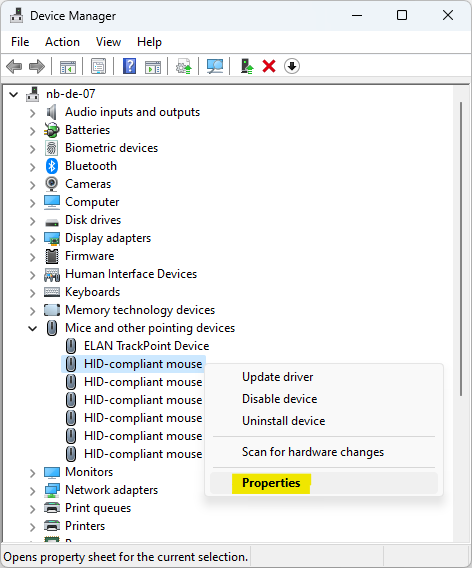
- Open “Device Manager” and open the “Properties” of your CadMouse:
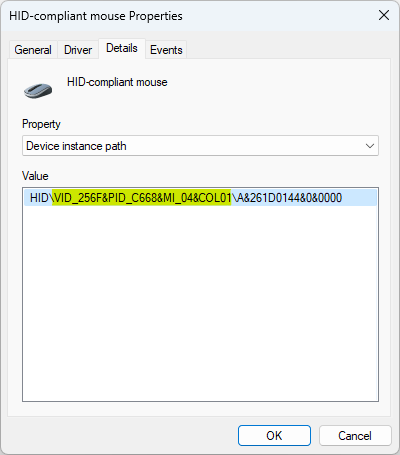
- Click on the Details tab and note down the “VID ID” value for the mouse — in this example “VID_256F&PID_C668&MI_04&COL01”
Note: General VIDs and PIDs of 3Dconnexion products are listed here.
Step B: Adjust the wheel scrolling direction
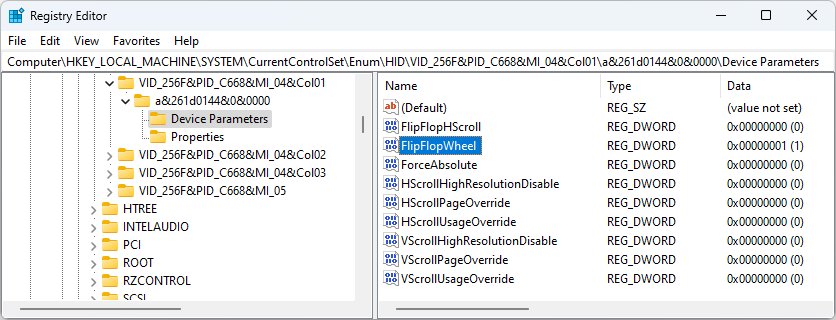
- Open the registry editor and browse to
HKEY_LOCAL_MACHINE\SYSTEM\CurrentControlSet\Enum\HID - Expand the folder (key) that matches the “VID ID” from Step 1 to “Device Parameters”
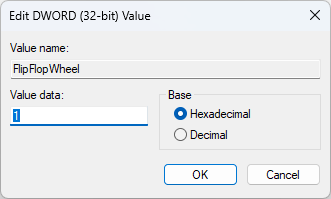
- Double-click the FlipFlopWheel DWORD and set the value from 0 to 1
- Reboot