Can I move the Windows cursor with a SpaceMouse?
We do not recommend moving the cursor with a SpaceMouse but – in special cases – this feature might be individually helpful:
1. Go to C:\Program Files\3Dconnexion\3DxWare\3DxWinCore\Cfg\ and open the file “Global.xml”
2. Add the following line:
<ButtonAction><ID>Driver_Desktop_ToggleGrab</ID></ButtonAction>
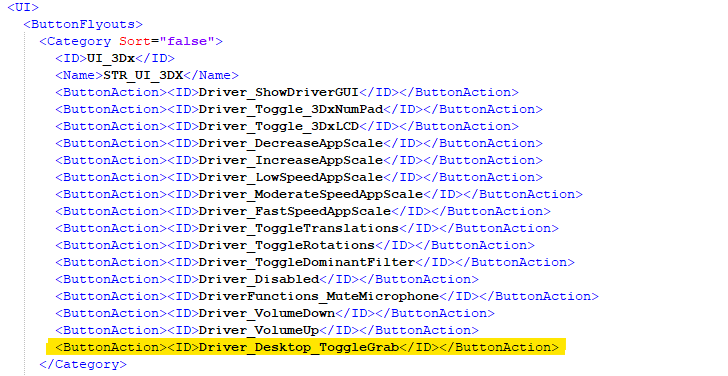
3. Download and copy the file “Desktop.xml” to %appdata%\Roaming\3Dconnexion\3DxWare\Cfg\
4. Stop and restart the driver
5. You will now find a new command for your buttons named “Desktop Mode On/Off” in the 3Dconnexion command category:
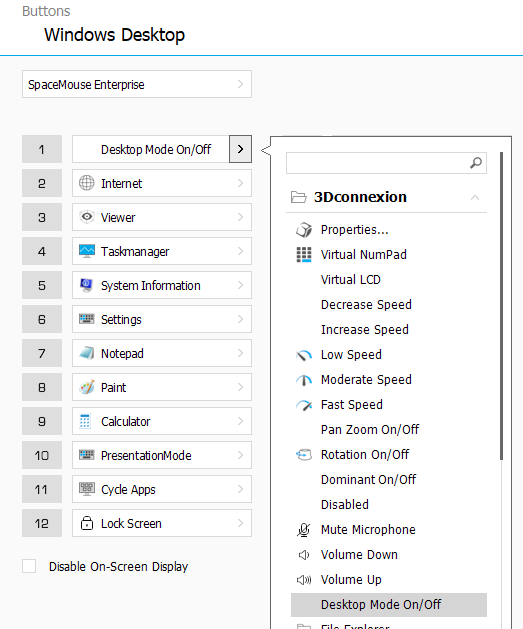
6. Map this command to any button to toggle into “Windows Desktop” mode which will allow the SpaceMouse to move the cursor.
Now the Windows Desktop mode will be always active (Application detection is now disabled)
To exit “Windows Desktop” mode, map the same command to a button and push it.